
Using Multiple VLANs with HP Virtual Connect Flex-10

In this article on using VMware ESX Virtual Switch Tagging (VST) with HP Virtual Connect, I showed you how to use the Multiple VLANs setting to map multiple VLANs onto a network connection so that the VLAN tags would pass all the way up to the VMware ESX/ESXi host—a necessary prerequisite for making VST work.

However, there is a key caveat to this approach that applies when using HP Virtual Connect Flex-10 and HP blades that have Flex-10 LOM (LAN on Motherboard) interfaces. As you might already know, Flex-10 LOMs have the ability to “subdivide” themselves into four logical instances, each of them a valid PCIe function, which are called FlexNICs. These FlexNICs appear as real, actual, physical NICs to the operating system installed on the blades. This includes VMware ESX/ESXi. In the Virtual Connect Manager, though, you have the ability to fine-tune the amount of bandwidth allocated to each of these FlexNICs, up to the shared maximum of 10Gbps.

This is pretty cool, but there is one limitation of which you must be aware—a limitation that is particularly significant in VMware ESX/ESXi environments. When you use the Multiple Networks option to map multiple VLANs onto a FlexNIC, you can’t map the same VLAN onto two different FlexNICs from the same LOM.

The FlexNICs are noted as LOM 1:a, LOM 1:b, LOM 2:a, etc. Again, as noted earlier, up to four FlexNICs are presented to the operating system on the blade. When you start assigning network connections in a Server Profile in Virtual Connect Manager, these network connections will bounce back and forth between the LOMs (assuming there are no other network interface cards in the server blade):

First network connection > LOM 1:a
Second network connection > LOM 2:a
Third network connection > LOM 1:b
Fourth network connection > LOM 2:b

Seventh network connection > LOM 1:d
Eighth network connection > LOM 2:d

As far as I know, there is no way to change this behavior.

With that in mind, what this means is that you can’t map the same VLANs to the first, third, fifth, and seventh network connections, or to the second, fourth, sixth, or eighth network connections. Why? Because each of these connections are logical FlexNICs on the same LOM, and you can’t map the same VLANs to more than one FlexNIC on the same LOM.

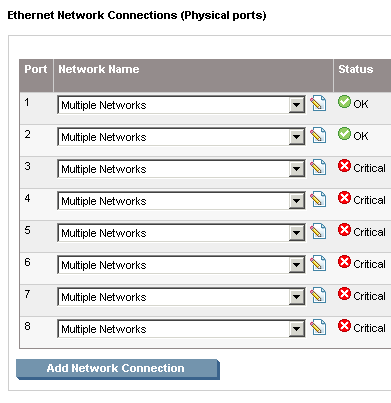
Perhaps an example would help. Consider the configuration shown in this figure, in which multiple VLANs are mapped to all eight connections in Virtual Connect Manager:
hp-flex10-vlans-incorrect.png

This screenshot shows how the VLANs are mapped for each of those eight network connections:

hp-flex10-vlan-mapping.png

As you can see, I have the same set of five VLANs mapped onto all eight network connections (all eight logical FlexNIC instances). But only the first two show OK—the rest show Critical. Why? Because these logical FlexNICs have the same VLANs mapped to them as were mapped to the first FlexNIC, and therefore Virtual Connect Manager has placed them into a Critical state (they’ll be reported as “Down” to an operating system on the blade).

This behavior is the strange behavior I tweeted about a few days ago, where I couldn’t figure out why Virtual Connect was behaving in the way that it was. Now I know why!

Contrast that first configuration with the configuration shown in this screenshot:

hp-flex10-vlans-correct.png

In this case, you’ll note that I do not have the same VLANs mapped to more than one FlexNIC on the same LOM. As a result, Virtual Connect Manager does not place any of the FlexNICs into a Critical state, and all eight show OK (and will be reported as Up to an operating system on the blade).

So what does this mean? In its simplest terms, it means you can’t use VST on all the FlexNICs—some of the FlexNICs will have to carry “ordinary” traffic to VMware ESX/ESXi port groups that have no VLAN ID specified. In the image above, you can see that the first three pairs of FlexNICs each carry a specific type of traffic. The matching output of esxcfg-vswitch --list for this VMware ESX host shows that the port groups on each of the three matching vSwitches do not have any VLAN IDs specified. This is because, in this configuration, these three pairs of FlexNICs carry only a single type of traffic, and that single type of traffic has no VLAN tags attached. Therefore, the VMware ESX/ESXi port groups must not have a VLAN ID specified in order for traffic to flow.

But it also presents some other interesting design considerations. If your VMware ESX Service Console (or VMware ESXi Management interface) is on the same VLAN as some of your virtual machines, you’ll run into an issue—you won’t be able to map the VLAN to one set of FlexNICs for Service Console traffic and then map that same VLAN to another set of FlexNICs for other virtual machine traffic. In effect, it greatly reduces the extent to which you can use VST on VMware ESX/ESXi hosts.

Of course, the other way of handling it is to assign only two network connections, map multiple VLANs to those network connections, assign the full 10Gbps of throughput to those two FlexNICs (network connections), and use a single vSwitch design.

As far as I can tell, this is not documented by HP in the Virtual Connect (or Flex-10) documentation. So, you might want to bookmark this article, or post it to Delicious.com or similar. Finally, as always, I’d love to hear any feedback or clarifications in the comments. Thanks!

Tags: , , ,

  1. Rob L.’s avatar

    Scott,

    Let me fill you in on a few other limitations of Virtual Connect and Flex-10 right now.

    If you need to make any changes to a server profile like adding a VLAN or adjusting the bandwidth of the Flex NICs you have to reboot the host. It is an issue in our environment where we have many VLANs and having to add one to an ESX host to support a new VM is not unusual.

    The previous Virtual Connect firmware version had a limitation that you could only map up to 32 VLANs from an uplink set. Again we use many VLANs and were bordering on this limit. The new firmware has increased this to 64. But the other limitation of the previous firmware is that you could map up to 28 vNetworks(VLANs) to a single FlexNIC. We have not got confirmation from HP that this number has increased with the latest firmware.

    Virtual Connect can’t take down the link of an individual FlexNIC, it can only take down the link of the whole physical NIC(all 4 FlexNICs). This is a problem if you use link status to do ESX network fault tolerance. Virtual Connect has a feature called Smart Link that if a Virtual Connect uplink goes down it will take down the server links. But again it can only take down the whole physical NIC and only if the all uplinks for all the vNetworks that are mapped to all 4 FlexNICs go down.

    I know HP is aware of some of these limitations and has stated they will be addressed in future firmware releases.

  2. slowe’s avatar

    Rob L,

    Thanks for the additional information. I was already aware of the need to have a server powered down in order to modify the Server Profile, but it is helpful to point that out again. If there is one limitation that HP most needs to address, it’s this one, IMHO.

    Similarly, the limitations on the number of VLANs and the number of VLANs that can be mapped to a single FlexNIC could similarly be problems for larger environments.

    As for the Smart Link limitation (not being able to take down a single FlexNIC), I don’t see that as a limitation–that makes sense to me. If an uplink goes down, you would WANT all four FlexNICs to go down because they all ride the same uplink (or same set of uplinks).

    Thanks for your comment!

  3. Matt’s avatar

    Thanks for taking the time to write this article, very useful as we are deploying vSphere on BL685s with Flex-10 VC modules.

    Does this scenario only happen with VLAN mapping or does it apply to VLAN tunelling as well?

  4. slowe’s avatar

    Matt,

    I do not know if there are similar limitations with VLAN tunneling. That is on my test plan, so I’ll post results here as soon as I have more information.

  5. Chris B (HP)’s avatar

    Scott,

    Thanks for taking the time to evaluate Virtual Connect. HP’s Virtual Connect with Flex-10 enables our customers to use VST on all FlexNICs providing they use different VLANs on each FlexNIC LOM. Replicating FlexNIC configurations between LOMs allows for teaming and chip-level redundancy. There is no advantage to using the same VLANs one each FlexNIC beyond the additional bandwidth; something easily tuned using the bandwidth parameter on each individual FlexNIC.

    Another alternative to mapping a VLAN to independent sets of FlexNICs for Console traffic and VM traffic would be to define two different Virtual Connect networks, one for service console traffic, and the other for the VM traffic. Virtual Connect will keep these two networks completely isolated, but you can bridge them externally. In many cases, it is desirable to keep those two separate anyway.

    Thanks again, we look forward to more insight.

    Chris

  6. slowe’s avatar

    Chris B,

    Thanks for adding your comments! I appreciate it. To help further drive home your point about presenting multiple VLANs to the FlexNICs, I’ve posted this follow-up:

    http://blog.scottlowe.org/2009/07/09/follow-up-about-multiple-vlans-virtual-connect-and-flex-10/

    Thanks again!

  7. Matt’s avatar

    I’m implimenting Flex-10 on BL460-G6 blades. I really don’t need the Flex-NICs, I’m just tunneling all the VLANs to the ESx servers. What I find anoying is the 6 dead links with no links, it is two bad there isn’t a way to make the unused Fle-NICs to go away. The bigger problem I have is a poorly documented problem, you can mix Virtual connect modules in one chassis, but a Flex-10 can not be in a slot next to a VC ethernet module. Anybody want to swap a VC ethernet for a Flex-10 module?

  8. Brad Hedlund’s avatar

    Scott,

    In this article you said: “you have the ability to fine-tune the amount of bandwidth allocated to each of these FlexNICs, up to the shared maximum of 10Gbps.”

    Question: Is the “Allocated” bandwidth for a FlexNIC a maximum not-to-exceed bandwidth? Or, is “Allocated” bandwidth a minimum guaranteed bandwidth with the ability to go higher if bandwidth is unused/available?

    In other words, suppose I have (2) FlexNICs on the same LOM port, each with an “Allocated” bandwidth setting of 5Gbps. If FlexNIC #1 is idle, not using any bandwidth, is FlexNIC #2 able to use 10Gbps? Or, in this scenario, is FlexNIC #2 still limited to a maximum of 5Gbps?

    Thanks,
    Brad

  9. Carl S.’s avatar

    There is a lot of meat in this post, so I am guessing it will take a bit of time to tackle specifics. If you do have Flex10 technical questions, posting them on the HP Blade Connect community is the best way to get a direct response from an HP resource.
    http://h18006.www1.hp.com/products/blades/components/bladeconnect.html

    I can’t comment on specific feature enhancements or firmware updates, so I will try to address your comments as best possible in those areas.

    Yes, there are some profile related annoyances noted by Rob and Scott. Originally Virtual Connect had the ability to change network mappings on the fly without powering off the blade. But with a recent flurry of Virtual Connect enhancements including Flex10, some of those features were temporarily disabled. We have added tons of enhancements over the last 2+ years, and I expect that you will see positive changes in the areas you noted.

    With regard to VLAN tunneling (multiple networks per FlexNIC), I have worked with VC and Flex10 extensively but have not come across many customers interested in tunneling large numbers of VLANs across a single FlexNIC. Obviously there is nothing wrong with doing that, just that experience has shown limited interest in that type of design. It would help to understand that VLAN strategy a little better to be able to comment more appropriately.

    Experience with VMware customers using Flex10 has shown that most are using a smaller number of VLANs to support VMs running on an ESX farm, and that Flex10 provides greater bandwidth and better LAN fault tolerance for VMware environments than was previously available. The big thing here was increasing the number of physical NICs presented to the OS and simultaneously increasing bandwidth (regardless of OS or application) – and at the same time lowering core uplink and edge interconnect costs.

    With respect to the limitations on SmartLink, there is logic there which requires a more detailed design discussion to fully address. Suffice to say that rules/reactions are different for FlexNICs with mapped (Single VLAN) and tunneled FlexNICs (Multiple networks). The SmartLink rules depend specifically on how your uplinks to the data center are configured, in addition to your VLAN selection on the FlexNIC. These need to be planned for on a customer by customer basis.

    I will keep posting as time allows.

  10. Daniel’s avatar

    Scott,

    We have our SC, Vmotion, and VM Traffic all on the same VLAN and you suggested “…assign the full 10Gbps of throughput to those two FlexNICs (network connections), and use a single vSwitch design.” as an alternate design. With 10Gbps, I don’t see a bandwidth issue. Are there any drawbacks to using a single vSwitch design for all 3 networks besides possible security risks with vMotion sent clear?

  11. geeko71’s avatar

    Hi

    Thanks for this Informations, this confirmes my findings.

    In my particular enviorement (vShpere Cluster, lot of Hosts, Nexus 1000v DVSwitch) i would like to realize the following configuration:

    2 x 4 x 10GbE Uplinks (vPC, LACP, all ports active)
    LOM 1a: mapped VLAN 2000 – 2050 for Management Stuff
    LOM 2a: mapped VLAN 2000 – 2050 for Management Stuff
    LOM 1b: trunk port (all VLANs from Uplink)
    LOM 2b: trunk port (all VLANs from Uplink)
    LOM 1c: mapped VLAN 2100, 2101, 2102, 2103
    LOM 2c: mapped VLAN 2100, 2101, 2102, 2103
    LOM 1d: mapped VLAN 2199
    LOM 2d: mapped VLAN 2199

    but im not able to realize this… neither in mapped mode nor in tunnel mode… :(

    can you coufirm thats no way for this config?

  12. geeko71’s avatar

    just found this dokument from HP…

    http://h20000.www2.hp.com/bc/docs/support/SupportManual/c01990371/c01990371.pdf

    Page 156
    It seems that the only solution is to split the Uplinks in 2 Groups…

  13. Chris C’s avatar

    geeko71, that is the exact solution that i ended up with.

    hosts have to do active/passive interfaces if uplinks are on different physical switches. etherchannels cannot span multiple devices by default. if uplinks are on the same switch or cisco vss is implemented (etherchannel spanning) then you can do mode 4 bonding or lacp on os’s.

    we have two hp c7000 chassis with two flex10 modules with one uplink per module. one uplink goes to 6500 A and the second goes to 6500 B. i have two vnet’s defined in VC on each chassis. this config is cumbersome but its the only way without having to purchase 4 more sfp’s for module interconnects which i cannot do at this time. all vlan are configured as smartlink and natve vlan is set. all flexnic’s are set up as multiple networks type interfaces. this allows for kickstart/jumpstart via rarpd or dhcpd which are untagged broadcast type traffic. this type of traffic will be dropped if native vlan isn’t set. os’s are then configured to do mode 1 active/passive bonding or ipmp and vlan tagging. this keeps things very simple.

    great article btw.

    /C

  14. Sam’s avatar

    We have an performance issue when using flex 10 with Nexus 7k or 5k
    we have latest firmware on VC 3.15 and OA 3.21 and we ran a backup on one of our blade that connected to flex 10 and Nexus 7k it will ran about 2 or 3 hours more, but if we bypass the flex 10 and go from cisco 3120 to Nexus 7k or 5k this will be much faster. Has anyone seen any issue between flex 10 talking to nexus 7k or 5k please let me know

    Thanks

  15. slowe’s avatar

    Sam, I have not personally seen this behavior, but perhaps other readers can weigh in and let us know if anyone has a solution.

  16. Jeremy Pack’s avatar

    >>If you need to make any changes to a server profile like adding a VLAN or adjusting the bandwidth of the Flex NICs you have to reboot the host

    I’m not an expert on this but from my own personal experience in July2011
    This restriction has gone away. (At least for Hyper-V) As I have seen repeated changes to the VC configuration immediately visible in the OS, with out the need for a reboot.

  17. Bestin’s avatar

    Hi,
    we can see that NICs are not going down on HP UX 11.3 on Bl 860s with smart link enabled feature eventhough the uplink is down.
    any suggestion

  18. Basheer’s avatar

    Thanks for sharing this info.

    Since I have a large ENV, I have more than 28 VLANIDs.

    Maximum vNets you can choose is 28.

    Any improvements on this ?

  19. Rob Yeichner’s avatar

    Basheer, the maximum amount of VLANs you can select for a particular Flex-10 NIC, is 28. I have seen environments with many more VLANs than this – you simply pass one set of VLANs up through one NIC, a second set of VLANs through a second, etc.

    With up to date firmware on your Virtual Connects – this configuration maximum gets a boost to 162 VLANs per Flex-10 NIC. The latest firmware is 3.30 as of this date.

  20. tayo dada’s avatar

    hi scott,
    please clarify how one is able to have vlan tagging on a virtual switch in esx out to the flexnic and onto a physical switch.

  21. slowe’s avatar

    Tayo, I’m not 100% sure I understand your question. If you designate the physical switch port as a VLAN trunk, then VLAN tags will be carried into the Flex-10 Virtual Connect switches and then onto the vSwitches in the ESX/ESXi host (with the limitations described in this post). Search this site for other posts I’ve written on working with VLANs in a VMware environment for more information. Good luck!